

how to install morrowind rebirth
How to install the mod and what is required to play it. Be sure to follow the instructions properly or you might experience issues with the mod.
Requirements
- "Morrowind Code Patch": Morrowind.nexusmods.com
- You need the US/UK version of the game.
- This mod requires the expansion packs.
Recommended
- "Better Dialogue Font": Nexusmods.com
- "MGE XE": Nexusmods.com
Installation
First make sure that you have the Morrowind Code Patch Morrowind.nexusmods.com installed prior to installing Morrowind Rebirth (This does not apply if using OpenMW). When installed open the Morrowind Code Patch program and tick the box "Bump/reflect map local lightning" in the visuals tab and the boxes "Allow scroll enchant price modifier" and "Separate axe inventory sounds" in the mod specific tab. Don't forget to press the "Apply choosen patches"-button afterwards. After having that sorted out proceed with the steps below:
Here's the file structure when you've unpacked the Morrowind Rebirth archive:

Copy the "Data Files" folder and paste it to one of the locations shown down below (regular or steam). The latter won't apply if you have Morrowind installed elsewhere:

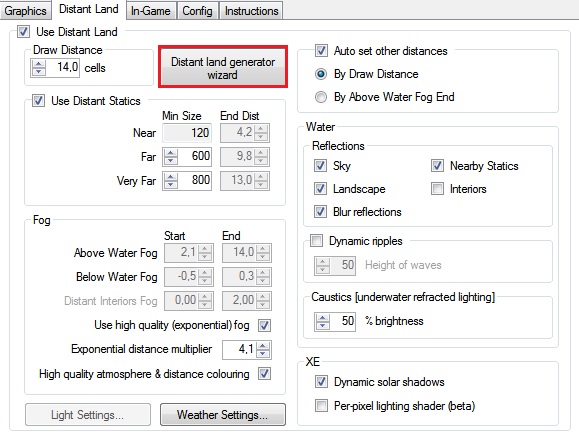
That should be it. Don't forget to tick the box "Morrowind Rebirth [Main]" and any other eso or esm that you want to use in "Data Files" on the start-up menu. Start a "New Game" in order to avoid dirty saves (or repair your old save-game using Wrye Mash). If you're using MGE or MGE XE, don't forget to re-run distant land to avoid potential landscape issues (see below). As for distant land I recommend a draw distance of maximum 8 cells.
Alternate Version
This folder contains a version of Morrowind Rebirth that removes the restrictions on spellmaking and enchanting, meaning that effects such as fortify attribute, fortify skill, drain health and invisibility can once again be applied to weapons, armor, clothing etc.
Compatibility patches
This folder contains several compatibility patches. The installation instructions on how to install these are provided in a separate readme.
Addons
Only "Morrowind Rebirth [Main]" is required for the mod to work, but I HIGHLY RECOMMEND using all of them but "Morrowind Rebirth - Mercenaries [Addon]" (which is a bit experimental) for the intended experience!
Morrowind Rebirth - Races [Addon]
This plugin will give all races new starting spells, abilities and powers.
Morrowind Rebirth – Game Settings [Addon]
This plugin tweaks the game settings that changes for example the cost of training, travel and the cost of commiting a crime.
Morrowind Rebirth - Mercenaries [Addon]
This plugin adds 10 new mercenaries to the game, who will protect you for a small fee. They can all be found walking the streets of the major cities of Vvardenfell. Note that this plugin is still a work in progress (use at your own risk).
Morrowind Rebirth – Birthsigns [Addon]
This plugin will tweak existing birthsign abilities, powers and spells while also adding new ones to the mix.
Morrowind Rebirth – Skills [Addon]
This plugin will tweak skill progression for the various skills in Morrowind such as block, sneak and destruction.
Morrowind Rebirth - Tools [Addon]
This plugin will tweak the quality, weight and the number of uses for apparatus, lockpicks, probes and repair items.
Optional Files
The optional archive contains new music, new desktop icons, and more. These are all optional and are not required for the mod to run properly. This download is separate and can be found on the same page from where you downloaded this archive.
how to install morrowind rebirth
Source: https://www.moddb.com/mods/morrowind-rebirth/tutorials/installation-requirements
Posted by: maurerwheirs.blogspot.com
0 Response to "how to install morrowind rebirth"
Post a Comment